Friday, 20 March 2015

Getting Started With Google App Scripts - Send Email From Google Spreadsheets

In This Modern World it would be better to have triggers to do our works automatically with less input feed and make more automated manner.and Recently,This was running in my head and concurrently i'm one of the member of Google Student club in my College and we were about to conduct a small workshop and one of the member took in-charge of getting online forms filled and select 30 students and sending them a confirmation mail to them and instruction.and it was successfully implemented in native hand written scripts in PHP and MYSQL.And there comes my idea of using Google App Scripts with Triggers in Action to Automate our Selection panel and E-mail Sending to who have registered.and suddenly gone through DOCS and tried with my mail and was sending mails in minutes from spreadsheet and thought of sharing it my followers,and recently i got request to write Google Apps scripts tutorial.

This is just Kick Start for Google App Scripts @ +i-visionblog !You can expect more business and Productivity based app scripts soon in our blog or personally contact me in mail for Other Apps Scripts for Business and Productivity.


Reference : Demo | Download Script

Motive :

Our Goal in this post is to send Email to the peoples who have submitted the form or recorded response and as well as Admin.The mail will be delivered from your mail inbox to the client through Gmail API.

Prerequisites :

  • A Google Account with Google Drive Enabled.
  • A Little knowledge in JavaScript to handle Arrays and functions.
  • Google Forms and Spreadsheet.
And little patient to test and Debug the code and check the log for error handling! 

Procedure :

Setup up A Basic Form with Google Forms.
    • Open the link create Simple Form with Name and Email as TEXT attribute and make it as mandatory by ticking required.
    • Then publish the form public and test whether it is working and accepting the form submission over public.
select Script Editor
Setting up Basic Script for sending the Mail with Script editor in Spreadsheet :
  • Go to the corresponding the Response Form Spreadsheet and open and view in Browser.
  • under Tools > Script Editor select it and will open the new tab with Google scripts page.
  • create new blank Project in Google App Script Editor.
  • And then with default code.gs file will be prompting you to type the code.
  • So,it's time now to write down the code for Responding the user with the mail who submitted the form with our function written in Google App Script Editor.

 Code : 

 function onFormSubmit(e) {

  var timestamp = e.values[0];
  var mailaddress = e.values[2];
  var body = e.values[1];
  MailApp.sendEmail(mailaddress,"TEST MAIL",body);

  }


The Above Code is self explanatory one ! however you could get the the response from the e variable as array e.values and with MailApp.sendEmail function you could send the email by passing the parameters as mail address ,Subject and body.note that always the first array value will be timestamp of submission and next will be your form values in according your arrangement in Google Form.

Steps to Execute :

Follow the steps correctly to test and execute the script.

select current project trigger

  • Click Current Trigger Project in Google App Script page Toolbar.
  • You will be listed with Triggers with corresponding functions written in code.gs,it must be mapped with corresponding events like spreadsheet on view,edit,update and adding entries and form submissions.
  • set up trigger 

    • Click on Notification > and change it to immediately for crash Reports 
    change to immediately to check your errors

    • Click Okay and in main Project Trigger confirm your identity by accepting the OAuth from google for delivering the mails on your behalf and with your name.
    • Now view the live form and test it in your browser and if all goes well just you will be getting mail who submitted the form with correct mail id.
    • If you need admin Email also just copy the same function and replace with your email hardcoded so that you may also get mail whenever the form is submitted.
    • If something you(Admin) will receive the script Failure Exception details via Email update immediately since we set immediately in our notification of current project triggers.

    My Result on Testing the Google Form :

    Test Mail successfully Received

    thus have a live Demo from above given link in reference section and download the code and try yourself.Always validate the input from the client! side for improving the security.

    Note: This post deals with the basic of Google App Script usage.You can do a lot with Google App Scripts almost you can Automate all your activities.Let us see about it in future post.subscribe our blog for updates and recent posts.

    For Bugs/Hugs/comments/doubts/updates and projects just drop mail to s.shivasurya@gmail.com or chat with me in Facebook/Google+ chat and for updates and interesting tweets/updates follow me in Twitter.
    Share is care.Feel free to comment

    Saturday, 21 February 2015

    App Indexing API For Google Search - Mobile Application Development

    Mobile Computing and Mobile Application Development is the Future,made me to think that Mobile apps and computing,optimization is going to be the next big thing on Earth.As i have experienced Android development as well As Web Development i could correlate the things like Google Search, Mobile Views and so on.As every one knew Mobile apps search are comparatively different from Desktop search,Where we could directly visit the Websites and make purchase and move on.But, in the case of Mobile it is going to be however hurting experience for both users and Developers to maintain and interact with Webview in Smartphones.So,Google came up with Solution to show and index apps on Google search on Signed in Browser for Android and show relevant apps that can be view with Mobile apps.

    So,if it is site we could submit the sitemaps to Google Bots and Crawl our contents for indexing,but in case of apps... so,here comes Indexing API to index your app contents and correlate the contents with web and mobile and Show suggestions on Google Mobile Search app.


    Prerequisites :  

       Download : Code at GitHub 

    We are just going to Create some content in app and try to show in Google Suggestion using Relevant Keywords.We will deal without web url in this post.
    • Android Phone with Play Account
    • Android Studio (Preferable because of Gradles )
    • Some Patience :D and Simple App to test it out.

    Procedure :

    As i don't write android app tuts here,Just Start Creating Simple App with main activity with some contents and title with relevant key title.You can refer the Source code from my Github Repo.There are two ways of App indexing as i have categorized with Web URL and Without Web URL.
    • With Web URL we could index the content of the app in Google Mobile Browser Search by showing your App and which will lead to open the App from native browser.
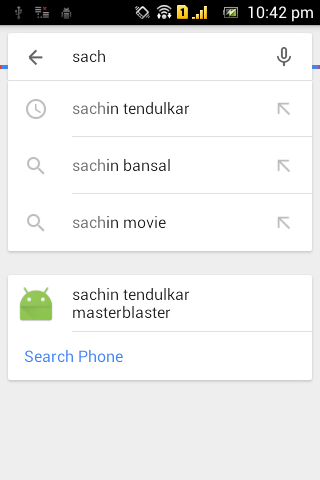
    • Without Web URL we could index the content of the app in Google Search Suggestion in Google Search App which leads to open the content of the apps.(BTW the search result display is not mentioned as far as i have read). 

    Configure Your APP :

    Just we have to configure your app manifest to accept the intents and make way to launch your app by other apps and receive data.Important thing in app indexing is having correct App URI and Keywords.Your app uri must be kind of,

    android-app://com.example.app/<scheme>/<host>

    However you can use your own custom scheme,Follow the given code below for example,


           <meta-data android:name="com.google.android.gms.version" android:value="@integer/google_play_services_version" />
            <activity
                android:name=".MainActivity"
                android:label="@string/app_name" >
                <intent-filter>

                    <action android:name="android.intent.action.VIEW" />
                    <category android:name="android.intent.category.DEFAULT" />
                    <category android:name="android.intent.category.BROWSABLE" />

                    <data android:scheme="cricket"
                        android:pathPrefix="/sachin" />

                </intent-filter>
            </activity>

    Test your app using adb command :

    adb shell am start -a android.intent.action.VIEW -d "cricket://sachin" com.ivb.app.app_indexing
    This must start the activity successfully without the errors! check out the code for manifest here.

    Without Web URL : 

    First of all let us assume that we have website with content and displaying in Google search results and we need to link that with our Android app.

    There are two steps to set up this App indexing API :
    1. First implement the API in the Android application with few lines of code,Check out the simple Activity title to be indexed here.

    Setting up Google API client :


    public class MainActivity extends ActionBarActivity {
        GoogleApiClient mClient;

        @Override
        protected void onCreate(Bundle savedInstanceState) {
            super.onCreate(savedInstanceState);
            setContentView(R.layout.activity_main);
        mClient = new       GoogleApiClient.Builder(this).addApi(AppIndex.APP_INDEX_API).build();


    using onStart method make your API call after loading your UI generally,make your web URL as null,since we don't deal with the with Web indexing now.we will deal with with web url in next post.


    public void onStart(){
            super.onStart();

                mClient.connect();

                final String TITLE = "sachin tendulkar masterblaster";
                final Uri APP_URI = 
      Uri.parse("android-app://app.ivb.com.app_indexing/cricket/sachin");

                final Uri WEB_URL = null;

                PendingResult<Status> result = AppIndex.AppIndexApi.view(mClient, this,
                        APP_URI, TITLE, WEB_URL, null);

                result.setResultCallback(new ResultCallback<Status>() {
                    @Override
                    public void onResult(Status status) {
                        if (status.isSuccess()) {
                            Log.d("success", "App Indexing API: Recorded recipe view successfully.");
                        } else {
                            Log.e("error", "App Indexing API: There was an error"
                                    + status.toString());
                        }
                    }
                });

        }

    Using onStop() method and disconnect the Client of GoogleAPI service


    public void onStop(){
            super.onStop();

                final Uri APP_URI = 
    Uri.parse("android-app://app.ivb.com.app_indexing/crciket/sachin");

                PendingResult<Status> result = AppIndex.AppIndexApi.viewEnd(mClient, this, APP_URI);

                result.setResultCallback(new ResultCallback<Status>() {
                    @Override
                    public void onResult(Status status) {
                        if (status.isSuccess()) {
                            Log.d("success", "App Indexing API: Recorded recipeview end successfully.");
                        } else {
                            Log.e("error", "App Indexing API: There was an error"
                                    + status.toString());
                        }
                    }
                });

                mClient.disconnect();


        }


    Use this API calls wherever you want and you can make it dynamic for same activity by passing relevant uri and keywords.And main important thing here is giving Relevant Keywords for your Activity and content to be indexed in Google search and suggestion.

    Note: After implementing this you can check your Google Search using Google Now/Search app Showing suggestion when you search relevant to your keywords.

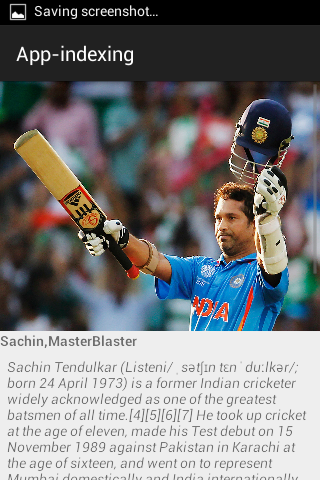
    My Results : Code hosted on GitHub


    Well we had seen how to index our app content with keywords and APP-URI through APP-INDEXING API.However before implementing this API,Just test it the App-uri using adb tool and check whether it is resolved successfully and opening your app.

    Lets implement with WEB url in next post with live App with search result indexing

    For Suggestions/Help/hug/bug or projects just drop me a mail to s.shivasurya@gmail.com or chat with me in Facebook/Google+ hangout or connect with me in Twitter for recent updates.Share is care and sign up for newsletter for recent updates in blog.

    Monday, 19 January 2015

    Developing iOS apps and Test with Ionic View For iOS - Apps Development

    i'm Big Fan of Ionic Framework and services,Eagerly waiting for ionic Creator GUI interface to develop cross platform apps.Ionic Framework becomes powerful Day to Day and web developers prefer to use it because Cross Platform Supported and good and Responsive User interface unless like JQuery Mobile and Powerful Angular Javascript for Application Logic and Controller.I love to Work with the this framework due to rich UI like bootstrap.Recently They have launched the iOS ionic view to Lively test your apps on ios via ionic Cloud service.Develop your apps wherever ! upload with single command and Download it and use it within the ionic view iOS app.This is Similar idea as like intel app framework to deploy on real device on Android.However since i don't have any MAC Device for Developing ios apps,this helped me to deploy it on original device and test it.


    Prerequisites :

    1) Learn Here to Install and Work with Ionic apps CLI and to Deploy.
    2) Create Account at ionic apps service

    Now let us create a Simple Ionic App to work it out in iOS through ionic view.

    Procedure :

    Open your command prompt and start typing command mentioned below,

    > ionic create <app name > blank

    This Above command will create Simple Template app with Hello world.

    Now just start creating the App from Scratch with HTML/JS/CSS may be cordova plugins for API Access.After just we have to upload the Project files to the ionic service.

    >ionic upload

    At the First moment it will prompt for Email and Password,Just give away the credentials and you application will be uploaded with success message.

    Caution : I had Recently updated Ionic , Cordova npm packages in my System,So.i didn't get any Error messages,So please Check your version and work it out.

    Confused State : 

    We didn't even add iOS as platform then how could we run it on iOS device,Actually i too had this Starnge :D funny idea but the whole fact is simple,we are uploading the HTML/JS/CSS files and running it in webview of iOS app.so when your deploying standalone app then you should add iOS platform to build the app and release.

    Work with your app on iOS :

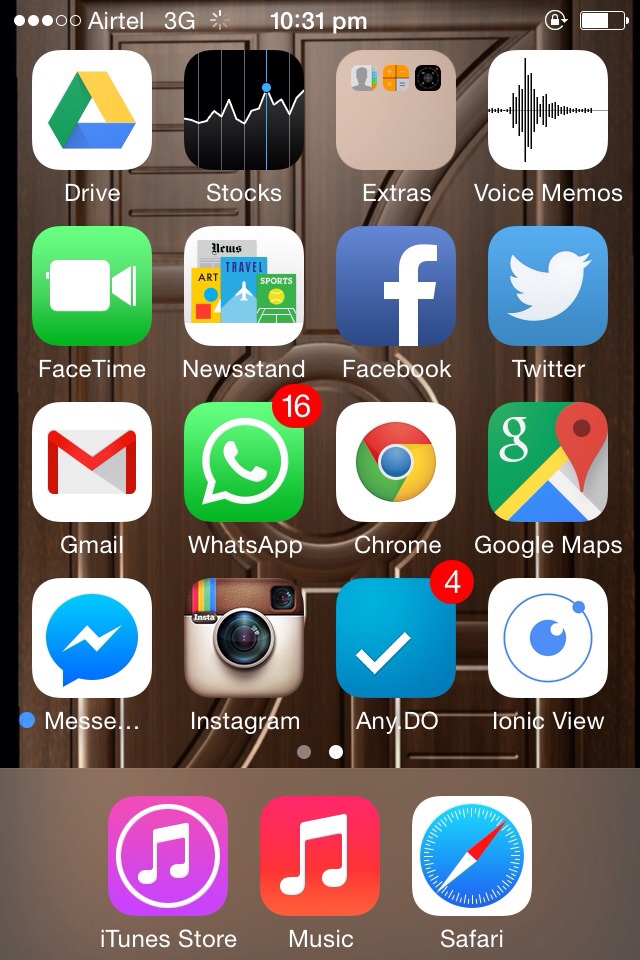
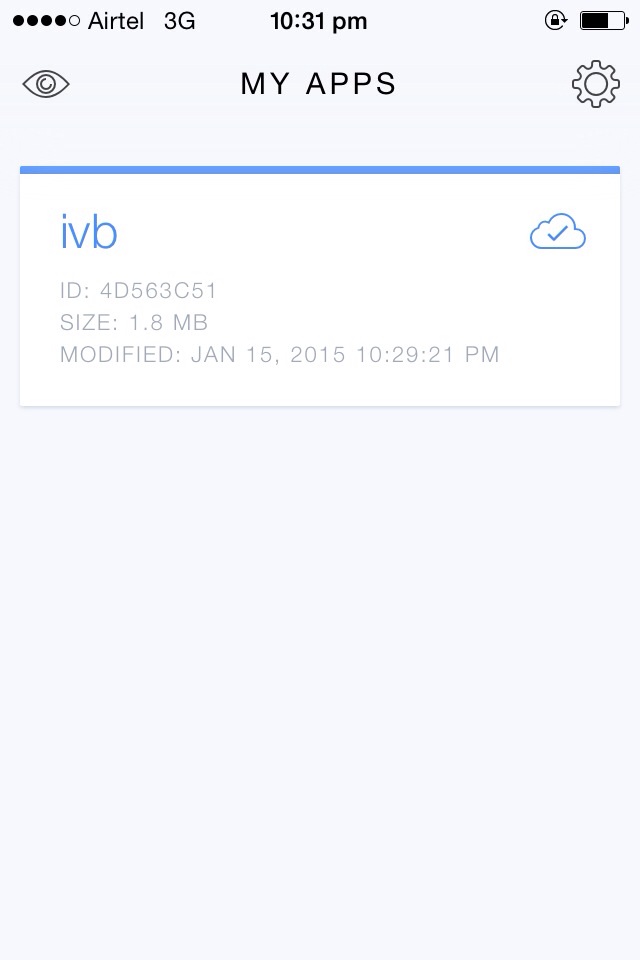
    Download the ionic view app from your iTunes Store.Login with your ionic app service credentials and your app will listed in the app.Just click to deploy within the Webview of that app to test it out.That's it.

    My Experience : 

    Recently i was working with +Mothi Venkatesh for apps development for Blogging platforms,We just Tested it with our Blog simple RSS feeds.


    Thus We have Successfully Tested our app in iOS Device,but it may have numerous limitation i hope in future for advanced users and developers.

    For bugs/Errors/Comments/Hugs just comment below using Disqus or mail me to s.shivasurya@gmail.com or connect with me in Facebook/twitter/G+ hangout chats for Discussions and Help.Share is care.


    Sunday, 11 January 2015

    Socket.io Twitter Streaming API - Node.js Deployed on Modulus.io

    We Would be curious About Chat Applications Response on time and blaming it if makes struggle a lot to connect with servers and message keeps on Failing with lot of Notification that "Message Failed".Many Of my Friends have faced that and Trolled the Application.And here comes the Technology known As Sockets/AJAX polling to instantly chat with our Besties/Crush :D .However we could use the Socket/Ajax Long polling Technology for Streaming Videos,Files and Tweets from Twitter for Web/Mobile and Desktop Apps too and for Real time Updates.it can be also used for Collaborative works over online to maintain concurrency among the group members and real time!


    Reference : Download | Live Demo

    Ultimate Goal :

    After Working/Reading this Post you can technically create and set up Node.js with Socket.io Server side and connect with Clients and Stream Media/Text Whatever may be!

    Prerequisite : 

    1) Twitter Account with Verified by Mobile Number(This is mandatory to create apps on Dev.twitter)
    4) Node.js npm Commands /basics 

    Procedure :

    Create a Twitter App :
    • Start Creating Twitter App - Link [ Callback not Required ]
    • Copy Consumer Key / Consumer Secret

      Setting Up Server : 

    Node.js Server Setup with Socket.io and Writing functions for events that Emit.Generally Node.js Event Driven Programming Language which has infinite loops to execute in single threaded.So just we are going to write some Routines for Functions which mean that they must Execute when corresponding event occurs.

     > npm install -g socket.io

    >  npm install -g express

    package.json :


     {
    "name":"tweets",
    "description":"Simple Streaming Twitter",
    "version":"0.0.1",
    "dependencies":
    {
    "express":"4.x.x",
    "twit":"*",
    "socket.io":"*"
    }
     }


    Install the package as per directed in package.json file.Additionally i have included twit which is also library acts for Twitter API.

    server.js :


    var express = require('express')
      , app = express()
      , http = require('http')
      , server = http.createServer(app)
      ,Twit = require('twit')
      , io = require('socket.io').listen(server);

       server.listen(8080);


      app.use(express.static(__dirname + '/public'));


     app.get('/', function (req, res) {

          res.sendFile(__dirname + '/index.html');
    });

    var target = ['cricket'];

     var api = new Twit({
        consumer_key:         'YYYYYYYYY'
      , consumer_secret:      'YYYYYYYYY'
      , access_token:         'YYYYYYYYYY'
      , access_token_secret:  'YYYYYYYYYY'
    })

    io.sockets.on('connection', function (socket) {


     var stream = api.stream('statuses/filter', { track: target })


      stream.on('tweet', function (tweet) {

        console.log(tweet);
        io.sockets.emit('stream',tweet);

      });

     });


    The above code contains the twit,Http and Express and then we written function to be triggered when connection to client is successfully established.here we are giving our required consumer key,Consumer Secret ,Access Token and Access Token Secret.with that we have added the streaming Watch list and then made API call to Twitter to get the Right Status and we are Emitting the Tweet as Data to our connected Clients via Sockets/Ajax Long Polling Approach.

    Read here about How Does Socket.io Works / Does Socket.io uses Websockets ?

    Client Setup :

    The Basic Rule is simple Javascript event is triggered to connect to the server and Long Polling is done on Server to ensure they are connected and either Data gets Transmitted/Received using the Events by Javascript Socket.io.


    A simple Client Example : 


    <script src="/socket.io/socket.io.js"></script>
       <script src="https://ajax.googleapis.com/ajax/libs/jquery/1.7.2/jquery.js"></script>
      <script>
            var socket = io.connect(); 
            socket.on('stream', function(tweet){
              $("#data").append(tweet.text);
           });
    </script>


    Resultant :


    Final Word :

    Thus We had Successfully created a simple Streaming from Twitter Real Time Updates with Node.js and Socket.io.If you're Downloading the Code replace the Keys and Work it out in Localhost and test the Streaming API from twitter.However this is the basic part of Socket.io.you could perform a lot when you go through the Documentation from Twitter!.

    We will see how to Deploy Socket chat apps/Real time Data Sharing apps on Cloud in Next post.

    hope you have Enjoyed!For bugs/comments/hugs/report/issue/help just drop me a mail s.shivasurya@gmail.com.or connect with me in Facebook/Twitter or Chat with me In G+.share is care.

    Monday, 5 January 2015

    Introduction To Internet Of Things - IOT with Frugal Labs at IIT Madras

    By last Decade the Internet came up with boom of several technology with popular Programming languages to run at server side and and delivering the clients machine.And by 2007 came up with Mobile Phones with Internet Access and by now it has matured and grown a lot.by the same side Internet usage is also growing and device connected to the internet is also growing heavily.So,some interesting thing came up know as Internet Of Things.Even many more popular company starts supporting it because it's scope in future is really needed when you deeply apply the science and Facts.


    I had attended Workshop Recently on Internet Of Things at +IIT Madras with my CollegeMates +SRIRAMAMOORTHY+Puviyarasu , +venkatraman,RamKumar, +sivasakthi,naveen,Senthil.Really it was Awesome to Work with them on IOT hands on Session by Frugal Labs!


    So,What is Internet Of Things ?

    Internet Of Things is Nothing but simple technique which Machine-Machine Interaction and Decisions,Predictions made by machines programmed and Sensed by sensors and Assisting the Humans Digitally for Day to Day life.

    A Fast Video on Internet Of Things :


    Some Day to Day IOT Ideas :

    IOT comes here to help you to Take Selfie with no Pain :p to monitor the Traffic in a Area and Notify you!Assume you have to take tablets in right time,IOT helps to notify and monitor you assisting digitally.It can Track,Sense and interconnect many Device and Share data and Respond to the Particular Situations.here is Small Video on Real Life Application on Internet Of Things in Day to Day Life!


    My Experience @ IIT Madras with Frugal Labs :

    We Got small arduino UNO board for Working out and connecting with Cloud and Mobile apps.We have Actually followed Python programming Language to Connect With IOT device and pushing data in to Cloud and KiWi App module from Python for Desktop Apps development and Simple Android App to control Device Via Bluetooth low Energy Device Module.My Small Snaps On Workshop Below!


    Arduino Board Connected With USB
    A Simple Program to Control LED and Check Temperature using Sensor
    Bluetooth Module to communicate between Device and Arduino board


    Hello World App :

    When We try New Thing we Always perform Hello World ! :D and we too done it successfully using arduino board and some LED lights on Board! 

    Temperature Sensor App :

    Then Comes Temperature Sensor module where we just coded for getting Room Temperature and Display in our Console.and We took the Data to Parse Cloud with the Help of Parse API and python Coding.

    Bluetooth Communication App:

    Finally we connected Remotely with Bluetooth to fetch Data from The arduino Board and Displaying in Either Computer Console/Android App console.

    Final Word:

    And The Above is just Beginner Level of IOT with Arduino programming and supported by INTEL and even more popular companies.hope you have got some Ideas about Internet Of Things Rite now.Visit the Frugal Labs site for more Workshop details and Assistance details.


    for more suggestions/Bugs/Hugs/help just mail me to s.shivasurya@gmail.com or start commenting below or chat with me in Facebook/G+ chat.share is care.

    Friday, 5 December 2014

    How to Scale Your Node.js App - Cluster API & Express with Benchmarking Siege

    Though Many Programming language emerge,Javascript Becomes more Powerful Day by Day competing from Front End to back End server and Entering into Desktop apps and Mobile Apps.And becoming popular over GitHub and trending over the world.I have been looking for scaling my Node.js App instance.However it bacame famous by one of it's reason SINGLE THREADED and ASYNCHRONOUS I/O operations.So, now lets create some master and Worker for our Node.js Instance make it run for us in available Processors in Server/Cloud to Balance our Load and Scale Your Node.js Application even Faster.Our Ultimate Aim is to use the Multiple Processor for our App and Maintain a Stable state between Master and Slave Workers and Communication between them.

    How to Scale Your Node.js App - Cluster API & Express with Benchmarking Siege
    How to Scale Your Node.js App - Cluster API & Express with Benchmarking Siege

    Reference : Download 

    Prerequisites :

    I would like to go through my previous articles on Basics of Node.js with Express Framework.
    Cluster API is Inbuilt Feature of Node.js ,We are just Going to test in our app and use it out.However use it with caution since it is marked as Experimental Feature till Right now.

    How Does it Works ? 


    Here we are creating a new Worker from master Cluster and working with the Workers,Generally you can fork process based on availability of processor.And if you like to fork even more,just Go through this Stackoverflow Thread.So,your Workers will handle your works automatically to load your balance.

    Procedure :


    we check it is master process or not and forking process as worker as do our specified operation to respond the client.


     var cluster = require("cluster");

     var cpu = require('os').cpus().length;

     if (cluster.isMaster) {
      
      console.log(cpu);
        cluster.fork();
        cluster.fork();

      
     cluster.on('online', function(worker) {
       console.log("Worker Started pid : "+ worker.process.pid);
     });

     cluster.on('exit', function(worker, code, signal) {

         console.log('worker ' + worker.process.pid + ' stopped');
       });

    }
     

    Worker Process :

    And with else you can write your application logic here to run with worker and respond to client.here you can notify the master thread with IPC and cmd.however we will do some basic operation over it.


     else {
      var express = require("express");
      var app = express();

     app.get("/",function(req,res){

      console.log("request : "+cluster.worker.process.pid); 
      res.send("Welcome to Node.js Cluster API Demo from"+ cluster.worker.process.pid);
     });

     http.createServer(app).listen(3000);


     }


    Test with Siege :

    Now lets test with Siege tool.Download it from here appropriate operating system install it or extract and use.


    use the command as below with your own options to check out the efficiency for our small app.


    C:\siege-windows>siege -t1M -c100 -d10s http://localhost:3000

    ** SIEGE 3.0.5
    ** Preparing 1500 concurrent users for battle.


    With Cluster API node.js 

    Without Cluster/Normal Node.js Single Threaded


    Further Functions:

    You have lot of functions to do with worker and Events to do with Worker and Master and inter process communication is also possible to do Cluster module.Search through npm for more ready made cluster modules for your apt application in production.Check here below for reference guide

    Note :

    The main thing is to scale the application both Horizontally and vertically.this can be achieved not only by clusters,you can run it in seperate VM's for more scalling.I am too looking for such experience and article.

    Hope you Learnt Something quite useful.For Errors/Bugs/hugs/suggestion comment below or mail to s.shivasurya@gmail.com or connect with me in Facebook/Twitter/Linkedin/G+ hangouts.share is care.


    Saturday, 8 November 2014

    jQuery Animated Number Counter From Zero To Value - Javascript Animation

    JQuery is powerful Library of JavaScript , Which makes the Web Development more Faster comparing plain JavaScript and completely useful for Beginners for building such application in minutes with lot of Functions in single line.And most powerful feature is JQuery Ajax which makes the users to relaxful usage of web app without page reloading and easy for developers to work with callbacks.Jquery is also famous for it's Animation and making app more amazing and pleasing with speed, fade etc..
    There are also lot of library which are built upon JQuery as Library,such as Bootstrap and so on.


    Install : Demo & Download


    You must need Jquery.js library use just cdn from google.


    <script src="//ajax.googleapis.com/ajax/libs/jquery/2.1.1/jquery.min.js"></script>


    Jquery:

    Using animate function JQuery we could perform this animation,here is the actual Documentation

    • first argument is CSS property ,which we would generally used to animate.
    • second argumet as option
    option : 

    1. duration  : amount of time in milliseconds for the animation occurance
    2. easing  : easing function for transition 
    3. step : This function provides an opportunity to modify the Tween object to change the value of the property before it is set.

    Logic css with Javascript :

    We get the count span counter CSS property starting from zero within a for each loop in jquery and setting the Counter as text by CSS property inside animation function and next comes option which has SWING as transition and then with duration and finally comes step option which is used to once again change the value before set and rounded off with math.ceil function.

    Code and Demo :

    Demo might load slow.have a look at demo hosted +codepen.ReRun the Code to see the counter changes!

    $('.Count').each(function () {
    $(this).prop('Counter',0).animate({
    Counter: $(this).text()
    }, {
    duration: 4000,
    easing: 'swing',
    step: function (now) {
    $(this).text(Math.ceil(now));
    }
    });
    });
    See the Pen FatiB by s.shivasurya (@shivasurya) on CodePen.


    Hope You have Enjoyed this post.Since it was cool one actually showing up in most of the modern websites , which made me to search and compile to perform this animated counter.and a reader too requested via me in Facebook to do with JQuery.

    For Errors/Comments/Bugs/Hugs mail me s.shivasurya@gmail.com or connect with me in Facebook/Twitter you can raise your exceptions/messages!
    share is care.