Showing posts with label computer. Show all posts

Sunday, 4 May 2014

Setting up virtual host in local server in XAMPP for simultaneous projects

virtual hosting is method of hosting on a single server with different domain name [your website address].It is also popularly known for shared hostings in web hosting industry.Mean while they handle too many techniques to handle request and on single server or set of connected ones,sharing mean here memory storage,processor cycles and many factors here are shared by many users those who host websites.i don't like shared web hosting but it is cheap and free to use for demos/test sites on original servers.i always recommend you for separate cloud/dedicated server or paid hosting server can be reliable for apps and business based websites which makes money! ;)


so i would like to explain setting virtual host on XAMPP locally on windows platform.

1) you have installed XAMPP server on your machine. or just download from official site and run the msi file.
2) first let us go through httpd-vhost.conf file entries

    go to C:\xampp\apache\conf\extra

3) we need to add some entries in httpd-vhost.conf file .better open it notepad or your favorite editor

add the follow codings at bottom of your file.(back your file and work)

NameVirtualHost *:80
<VirtualHost *:80>
DocumentRoot "C:/xampp/htdocs"
ServerName localhost
</VirtualHost>

and in the same file add code to customize your virtual host

<VirtualHost *:80>
DocumentRoot "C:/xampp/htdocs/router" /*within this you can point valid directory */
ServerName test.dev
ServerAlias www.test.dev
<Directory "c:/xampp/htdocs/router"> /* within this you can point valid directory */
Order allow,deny
Allow from all
</Directory>
</VirtualHost>

please remove comments from above coding.
save it and go to host file in windows C:/Windows/System32/drivers/etc/hosts
now open the notepad with Administrative rights to change the host file.an add the entry in it,add as last file entry.
127.0.0.1             www.test.dev

and save the file!!
4) restart your web server httpd service in your laptop/pc. you must get like this below here.
check out my url and it is my index.php

5) thats fine now you can access it from new url with your local websever given in host files.

though it is common tutorial here.it is valuable because when we work on different project this come handy and i was very sad to use same directory when i didnt approach this technique.share is care.report bugs as comments.dont play with host files better work with back up!.

Saturday, 1 February 2014

Bridging the gap between HTML5 & Smartphone application -read more @i-visionblog.com

The world is now driven now by Applications in Smartphones.As according to Mashable.com the whole world uses the Application in Smartphones.Thus integrate your website from web browser to your Smartphones.Let us use HTML5 and Phonegap to build your application.Additional to that we could just use jQuery Mobile to handle the website efficiently that supports numerous device.so,let us discuss about the jQuery mobile + Html5 + Phonegap to build successful Android,i-OS,Windows 8,Web OS,Blackberry.


HTML5:

html5 enables you to create awsome markup and structure for your layout in application either may be a Smartphone application  or web browser application.Most of the browser supports html5,taking it as an advantage we could successfully create a markup or a plan for your application.It  has advantages of integration of new <video>, <audio> and <canvas> elements, as well as the integration of scalable vector graphics (SVG) content.


JQuery mobile:

JQuery Mobile enables the user to interact with the device and provides an excellent environment for the users.And taking this as advantage programmers can many function based on their particular event.for example ajax request on clicks or on hover.Thus jquery mobiles provides excellent tutorial about their usage in html5.


Phonegap:

and finally comes here phonegap which is lead by Adobe now.provides us to create application by online uploading and downloading as number of apps for  Android ,i-OS,Blackberry ,Windows 8 ,Web OS,Symbian.The adobe lets you cloud service for building your application within a secondes and makes ready for download.


Procedure:


1)Just use HTML5 + JQuery Mobile create your simple web application and check it with your browsers that are capable of html5.
2)You must have an Adobe ID account or GIT hub account try the Conversion of html in to application that supported in Smartphones
3)Here,i have signed with GIT hub Account.
note: Phonegap Allows you to create 1 Application for free by uploading it privately,where it allows numerous unlimited by making it open source file using git hub and pull the request from there to create your application.
4)Upload your files with Private apps section and make your source file as .ZIP file and upload it.
5)After successful upload you would be shown with the mobile apps that is ready to download and install in your Smart phones as seperate files that includes Android ,i-OS,Blackberry ,Windows 8 ,Web OS,Symbian.
6)you can provide Name,Logo,Description,Version,package name and managing collaborators and enabling debug options.
so, this Phonegap webservice on cloud helps you to create smart phone Application with minimum efforts!

please mention the bugs if you could find it.feel free to comment below.share is care.


Sunday, 12 January 2014

Increase Internal memory of android phone - read more with @i-visionblog

The whole world is now moving towards Mobile OS such as Android,I-OS,Blackberry OS and so on.This becomes a scope for many Applications to develop and run in the specific OS.And this makes the users to experience the worth of Android or any mobile OS phones equivalent to the desktop computers.Thus RAM is specifically needed to run apps on the specific platform and experience the users flexibility and reduce the inconvenience.Human Desires are uncontrollable,Thus We always in search for more options and applying in this topic you could increase your internal memory of your android phone and experience more app usages.


Requirements:

1) A Rooted Android Phone.
2) Link2SD application - Download
3)Mini Tool Partition Application for your PC or Laptop - Download
4) SD card above 2 GB

Procedure:

1)Download the Mini Tool Partition for your PC with correct configuration and install it.
2)Connect your SD card with PC via. Open mini tool partion on your pc.
3)Right Click on name of Your SD card and click delete.
4)Now right click again and click the Create option.
5)Give the file system as FAT32 and select create as primary.give the name of the label and drive letter of sdcard.Give the partition size which is used as a external storage of your choice.
6)Now right click on unallocated space and click on create and click on yes.give create as primary and select file system as ext2 or ext3 or ext4 whichever that suits your phone.Give the name of the partition label and select all remaining unallocated space for partition.This partition is used as internal memory in your phone.

7)Now click on ok and then click on apply option on upper left corner.The partitioning will begin.
8)Wait till the process is completed.After completion put your sd card in your phone
9)Open link2sd in your phone and select the extension ext2 or ext4.
 10)Allow superuser request.
11)when it displays mount scipt created reboot your phone.
12)Open link2sd in your phone.Go to settings select autolink and go to autolink settings  and select
Link application file,linkdalvik-cache file,link library files.
go back to settings and under general options select relink lib files at boot,fast scroll.
13)Now select install location and select external.


That’s it now whenever you install an app it will be installed in the second partition of the sd card rather than in the sd card or internal memory.Therefore the second partition will serve as additional internal memory.Suppose to install the app in sd card or internal memory deselect autolink option and select install location as automatic.

NOTE:THIS MAY SOMETIMES BRICK YOUR PHONE.TRY AT YOUR OWN RISK

feel free to comment below.


Increase Internal memory With Chandeesh Babu,TCE.

view my profile on fb: Chandeesh Babu

Mail Id :  chandeeshkr@gmail.com

Thiyagarajar College Of Engineering.

Saturday, 11 January 2014

Enabling Replies in Facebook Comments for Profiles- read more @i-visionblog

We are living in Profile world which we represent in the form of Photo updates and status updates where others could comments,likes,+1's.We are addicted towards Likes,Comments,Replies in Facebook.Increasing the heat i have written an simple article to enable Replies For your profile in Facebook.Actually Facebook Allows Legal option to have only replies for Facebook Pages to experience more comment activities separately.so,Why can't we upgrade and maintain Facebook replies for comments for our profile too.Just have look at the procedure!


How Does Replies On Facebook Helps?

Facebook Introduces Reply option in Addition to comments to make the users more sophisticated and experience till the core of commenting the status,Photos and whatever else in Facebook.Actually they are officially used in Facebook Pages for admins to reply to their Followers.

How to Enable?

1)Login to Your Facebook Account in Google Chrome Browser.
2)open new tab type touch.facebook.com
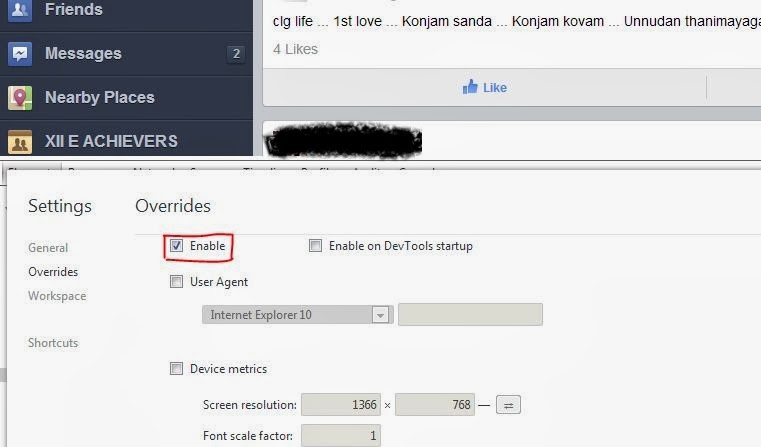
3)Right click and select Inspect Elements.
4)Click on the Gear Menu On the Bottom Most right corner (Just Above Your Clock)

5)In that Click the OverRide Option And Click on the Check Box override option.


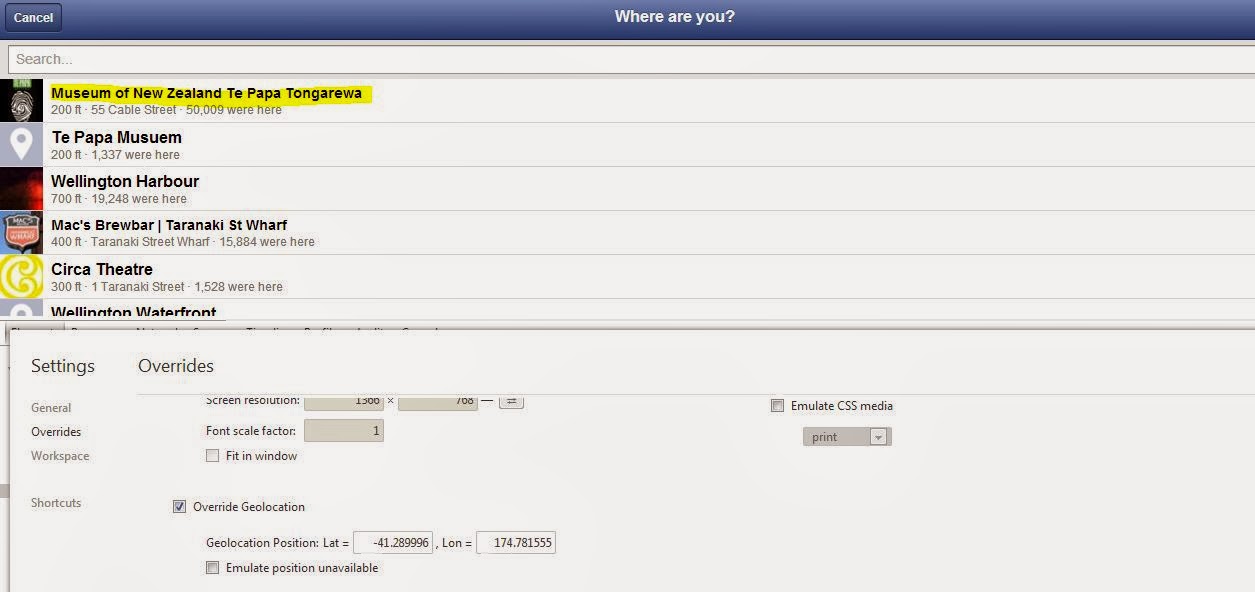
6)Enable override Geolocations And enter the following appropriately Lat:-41.289996 & lon:174.781555 and just press enter key. now  Check In.(please don't post it ,just leave it )

7)now open your Facebook.com Desktop site normally and post anything.

8)try to comment them You would be recieving an Reply option to that. Have fun!

How to disable ?

1)Just Go to the same Place Geolocation ,make Latitude & Longitude text box empty and uncheck all boxes.

2)Click CheckIn the same page.
3)this Return backs to normal state once again with comments alone in every posts.!

we are not responsible for any other changes in your accounts in facebook.try it in your own risk as we dont know the effect of the enabling replies in facebook profile.try it on your own profile at own risk.our blog is not responsible on anyway!

Wednesday, 11 December 2013

How Does Facebook Status Update works - learnmore with @s.shivasurya

Facebook has a cool feature that can update status each and every time by the users using various devices i.e. android ,web, i-os , blackberry etc.,so whenever you update status it may consist of text and images which is shown on wall where other friends view your updates.have you ever wondered about how does the status update works?


what is status update?

Status update is a option in a Facebook that enables the user to share their real life experience and they could tag their friends in the status, explain thier mood in status,current location and timings too.they are being shared on the user's timeline and where other users can review it.

why status update?


"If Facebook wall & News feeds is the heart of the Facebook,then status updates and photo updates act as Blood of Facebook "

in the real life world peoples are tempt to share their own experience on the social networking sites in the form of text or images.they just share and post "what's on your mind?"
addition to which user have Like buttons,comment & sharing options to make the status update still more valuable and interesting.


You would have come across a funny status from users,
"
Behind every successful status update, there is a Ctrl+C & Ctrl+V " :p


have a quick demo here. download the files from here.

here is script for updating status in Php language with mysql+ajax.

javascript for update.php

<script type="text/javascript" src="jquery.js">
</script>
<script type="text/javascript" >
$(function() 
{
$(".submit").click(function(){
var test = $("#shivasurya").val();
var info = 'id=' + test ;
$("#loading").show();
$("#loading").fadeIn(200).html('<img src="../loader.gif" />Loading Comment...');
$.ajax({
type: "POST",
url: "statusexec.php",
data: info,
cache: false,
success: function(html){
$("ol#update").append(html);
$("ol#update li:last").fadeIn("slow");
$("#loading").hide();
}
});
return false;
});
});

</script>
html code for update.php

<body>
<div id="loading"></div>
<ol id="update" class="timeline" style="height:70px; width: 700px;">
</ol>
<form id="form" method="post" >

<h4 style="font-family:Verdana, Geneva, sans-serif;" > UPDATE STATUS </h4>
<textarea id="shivasurya" style="height:70px; width: 500px; border:dotted;" placeholder="your status here!"></textarea>
<input type="submit" value="post" class="submit" /> </form>
</body>
statusexec.php

this file is essential to process the statement and save in database!


<?php
include('./config.php');
if($_POST['id'])
{
if($_POST['id']!='')
{
$comment=$_POST['id'];

if(get_magic_quotes_gpc())
{
$message = stripslashes($comment);
}
$comment = mysql_real_escape_string(nl2br(htmlentities($comment, ENT_QUOTES, 'UTF-8')));

if($s=mysql_query('insert into statusupdates1 (status,timestamp) values ("'.$comment.'","'.time().'") '))

{ echo "success";
?>
<?php
}
else
{ echo "something went wrong we are trying to fix it soon as possible";
}
}

}
?>
<li claas="box">
your status update was successfully executed!
</li>


thus here i have explained here a simple status update with showing the message success/error! but there is a lot behind this,if you are really interested i will mail you advanced status updates! feel free to comment below!

Instant Photo Uploader In PHP & JS -learnmore with @s.shivasurya

photos describes real life moments in our life.peoples just take snaps and remember their loved ones in their life.due to advancement in network and social networking, It is possible to share Your real life Photos on internet via. social networking!.photo uploads are the important heart of the social networking sites.Nowadays peoples just use apps on the go,to photo and quickly share via social networking sites,where in few years back the just use upload options to upload the photo to the website just like facebook does now.usually when we go outing with your friends,those moments are shared on social network.(including your boyfriend/girlfriend) :P

facebook illustrating photo sharing!


why we use photo upload?

Photo becomes a important representation of someone in internet and which could feel better for the users to identify and recognize them easily.for this,photo uploader comes as handy option for instant upload of photo to database.


what ways photo uploaders are used currently?

1) profile picture of any account.(Eg.Facebook,Twitter,Dropbox,Google+,etc.)

2) online job resume submission and online form submission needs photo uploader

3) photo upload via google image search engine to find similar pictures.

4) photo upload for website to create good looking dynamic contents.

so,photo uploader plays a vital role in behind of our every photoupdates+likes in Facebook and +1's in Google :p


here lets see about instant photo uploader with dragging and resizing image for upload.

take a live demo here.

let us create indeximg.php

<body><div class="wrap" style="width:auto;height:auto;"><img id="uploadPreview" style="display:none;" height="auto" width="auto"/><form action="upload.php" method="post" enctype="multipart/form-data"><input id="uploadImage" type="file" accept="image/jpeg" name="image" /><input type="submit" value="Upload"> <!-- hidden inputs --><input type="hidden" id="x" name="x" /><input type="hidden" id="y" name="y" /><input type="hidden" id="w" name="w" /><input type="hidden" id="h" name="h" /></form></div></body>

javascript :

Download javascript files for the instant uploading & dragging! here.

<head>
<script type="text/javascript" src="http://ajax.googleapis.com/ajax/libs/jquery/1.7.1/jquery.min.js"></script>

<script type="text/javascript" src="./js/jquery.imgareaselect.pack.js"></script>
<script type="text/javascript" src="./js/script.js"></script></head>

Css:
add up these codes in between head tag as style tags

use the css codes from zip!

upload.php

this is the script which process the image and submits to database or to view the success/Error Message!

<?php
$valid_exts = array('jpeg', 'jpg', 'png', 'gif');
$max_file_size = 2000 * 1024; #200kb
$nw = $nh = 200; # image with # height

if ($_SERVER['REQUEST_METHOD'] === 'POST') {
if ( isset($_FILES['image']) ) {
if (! $_FILES['image']['error'] && $_FILES['image']['size'] < $max_file_size) {
$ext = strtolower(pathinfo($_FILES['image']['name'], PATHINFO_EXTENSION));
if (in_array($ext, $valid_exts)) {
$path = 'uploads/' . uniqid() . '.' . $ext;
$size = getimagesize($_FILES['image']['tmp_name']);

$x = (int) $_POST['x'];
$y = (int) $_POST['y'];
$w = (int) $_POST['w'] ? $_POST['w'] : $size[0];
$h = (int) $_POST['h'] ? $_POST['h'] : $size[1];

$data = file_get_contents($_FILES['image']['tmp_name']);
$vImg = imagecreatefromstring($data);
$dstImg = imagecreatetruecolor($nw, $nh);
imagecopyresampled($dstImg, $vImg, 0, 0, $x, $y, $nw, $nh, $w, $h);
imagejpeg($dstImg, $path);
imagedestroy($dstImg);

} else {
echo 'unknown problem!';
                                       echo 'try again using later! <a href=indeximg.php>Try again</a><div><br />';
                                       echo '<img src="http://book.flypeach.com/App_Themes/Default/Images/error.jpg"></div>';
} 
} else {
echo 'file is too small or large';
     echo ' try again using later! <a href=indeximg.php>Try again</a> <div><br />';
echo '<img src="http://book.flypeach.com/App_Themes/Default/Images/error.jpg"> </div>';
}
} else {
echo 'file not set';
echo ' try again using later! <a href=indeximg.php>Try again</a><div> <br />';
echo '<img src="http://book.flypeach.com/App_Themes/Default/Images/error.jpg"></div> ';
}
} else {
echo 'bad request!';
echo ' try again using later! <a href=indeximg.php>Try again</a><div><br />';
echo '<img src="http://book.flypeach.com/App_Themes/Default/Images/error.jpg"></div>';
}

?>

well when you select the image for uploading,it would be suddenly shown you a preview and you can choose the area to upload to the server folder!


this uploading tutorial helps the users to preview the image and upload it in better manner!

have a fun! follow for constant updates and tutorials.if u feel free comment below!

Tuesday, 10 December 2013

Create Your Own Search Engine in PHP -learnmore with @s.shivasurya

world wide search!
nowadays we are living in technological world,we search over internet from creating a food stuffs from you-tube till your loved ones on facebook :P .so our search always continues till our death.we search articles on internet and getting lot of results.so how does it works?
have you ever wondered about search Engine works,while you search for specific need on google, bing, or yahoo!


what is search engine?

A web search engine is a software system that is designed to search for information on the World Wide Web. The search results are generally presented in a line of results often referred to as search engine results pages (SERPs). The information may be a specialist in web pages, images, information and other types of files. Some search engines also mine data available in databasesor open directories. Unlike web directories, which are maintained only by human editors, search engines also maintain real-time information by running an algorithm on a web crawler.

why search engine?


Searching through best sources like Google and Yahoo not only enhances the search results but it also enables users to cut down extra results. You can customize your search by using special marks and precisions. Advance searching is facilitated on different searching tools. You can also search about a particular word. Also you have an option to specify the type of information you are looking for. You can mention the type of file to cut down the search of other information.
Organized information:
Instead of exploring blogs and websites to find the relevant information, the results of search bars are organized. They will give relevant information which is organized and precise.
Best results of any search are possible if you know how to use these tools for searching. Learn techniques to improve your searching techniques.
your searches at google!

so lets see a simple coding in PHP to develop search in your database.

take a live demo here LIVE DEMO

download the script here download

create search table in mysql db:

CREATE TABLE IF NOT EXISTS `search` (`link` varchar(2000) NOT NULL,`title` varchar(2000) NOT NULL,`comment` varchar(2000) NOT NULL, `content` varchar(2000) NOT NULL) ENGINE=MyISAM DEFAULT CHARSET=latin1;

search.php


<!DOCTYPE html PUBLIC "-//W3C//DTD XHTML 1.0 Transitional//EN" "http://www.w3.org/TR/xhtml1/DTD/xhtml1-transitional.dtd">
<html xmlns="http://www.w3.org/1999/xhtml">
<head>
<meta http-equiv="Content-Type" content="text/html; charset=utf-8" />
<title>S-mail search engine</title>
<style type="text/css">
*{margin:10;padding:0;}
ol.update
{
list-style:none;
font-size:1.1em; 
margin-top:20px 
}
ol.update li
{
height:70px;
border-bottom:#dedede dashed 1px; 
text-align:left;
}
ol.update li:first-child
{ 
border-top:#dedede dashed 1px; 
height:70px; 
text-align:left
} 
.submit
{ width:200px;
margin-left:200px;
height:30px; padding:10;
}</style>
<script type="text/javascript" src="http://ajax.googleapis.com/ajax/
libs/jquery/1.3.0/jquery.min.js"></script>
<script type="text/javascript">
$(function() 
{
$(".submit").click(function() 
{
var search_word = $("#textboxcontent").val();
var dataString = 'keyword='+ search_word;

if(search_word=='')

{
}
else
{
$.ajax({
type: "GET",
url: "searchajax.php",
data: dataString,
cache: false,
beforeSend: function(html) 
{
document.getElementById("loadplace").innerHTML = ''; },
success: function(html){
$("#loadplace").show();
$("#loadplace").append(html);
}

});


}

return false;
});
});
</script>
</head>
<body><span><h2 style="font-family:Verdana, Geneva, sans-serif; margin-left:250px;">S-mail searches</h2></span>
<br />
<form method="get" id="form" >
<input type="text"  id="textboxcontent" class="textboxcontent" style="width:1000px; height:20px;"/><br /><br />
<input type="button" name="search" value="search now!" class="submit"/> </form>
<ol id="loadplace" style="height:auto;width:500px;margin-top:3px;" class="update">
</ol>
<div id="flash" align="left" &#65533;></div></div>
</body>
</html>


searchajax.php


<html>
<head>
<META HTTP-EQUIV="Content-Type" CONTENT="text/html; charset=UTF-8">


</head>

<?php
include('config.php');
if(isset($_GET['keyword']))
{

$comment=$_GET['keyword'];


if(get_magic_quotes_gpc())

{
$message = stripslashes($comment);
}
$comment = mysql_real_escape_string(nl2br(htmlentities($comment, ENT_QUOTES, 'UTF-8')));
$s=mysql_query("select * from search where content like '%$comment%' or link like '%$comment%' or title like '%$comment%' ");
while($h=mysql_fetch_array($s))
{ ?>
<div id="smails" style="width:800px;height:80px;">
    <div id="org" style=" float:left; height:20px; width:800px;">
<a href="<?php echo $h['link']; ?>"><?php echo $h['title']; ?></a></div>
    <div id="org" style=" float:left; height:40px; width:800px;word-wrap: break-word;">
<?php echo $h['content']; ?></div>
    <div id="org" style=" float:left; height:20px; width:800px;">
<?php echo $h['comment']; ?></div>

    </div>

<?php } }
?>

 </html>

this codes provides you a basic level search engine type! you could integrate it by developing a complete database.
if you feel free share your experience as comments! 

Friday, 6 December 2013

Send Free SMS from Google-G-MAIL - learn more with @s.shivasurya

sms from google
Short Message Service (SMS) is a text messaging service component of phone, web, or mobile communication systems. It uses standardized communications protocols to allow fixed line or mobile phone devices to exchange short text messages
SMS is the most widely used data application, with an estimated 3.5 billion active users, or about 80% of all mobile phone subscribers at the end of 2010.The term "SMS" is used for all types of short text messaging and the user activity itself in many parts of the world. SMS is also employed in direct marketing, known as SMS marketing.
SMS as used on modern handsets originated from radio telegraphy in radio memo pagers using standardized phone protocols. These were defined in 1985 as part of the Global System for Mobile Communications (GSM) series of standards as a means of sending messages of up to 160 characters to and from GSM mobile handsets. Though most SMS messages are mobile-to-mobile text messages, support for the service has expanded to include other mobile technologies, such as ANSI CDMA networks and Digital AMPS, as well as satellite and landline networks.
so let's see about sending SMS using G-Mail Account.

for hangout users You Have to downgrade to ordinary chat in G-mail as it was before.(revert to old chat)

1) first You Have to Enable Google Labs inside G-mail
 click settings button below Your profile picture. and select,

enable google labs!

2)go to chat list Just place the cursor on the contact that you wanted to send sms


and invite by -> SMS
you will asked for a phone number by pop up box just provide it.

3)start texting to your contact.


note:
Google gives 50 credits per day. If you send one SMS your credit is decreased one. In the same time if you receive a reply by the person you can get 5 credits. So you can able to chat unlimited messages with gmail. 


cheers!if you feel free,please comment below.


Thursday, 5 December 2013

What is Ajax? - Learn more with @s.shivasurya


Ajax scripts plays a vital role in web development and enhances the user experience in the website.they provide excellent environment for users to get update instantly with a better look without any action such as reloading or refreshing.Nowadays most of the web application uses ajax scripts numerously for the better action towards database and user interface.
auto suggestion list of google


example You may take facebook comments for ajax
,
Facebook comments are driven by Ajax scripts,when you guys just tap over the comment box ,the ajax scripts carry the data to the database through a php or any other programmed file and then result would be in the form of the new comments.but actually the append the comment near the old comment.only when You refresh the whole page,You are really querying a database to get the comment.thus Ajax plays vital role in compromising both programmer and the user.it is the script which allows the programmers to pass the data easily and display the data in excellent original format for the users.
almost Every function in facebook  works as ajax scripts rite from Friend request tll Your personal messages uses basic principle of ajax.

another famous example from Google for ajax,

from around 2004 Google is using the auto-suggest list from this Ajax became famous all around ,started implementing in websites which makes excellent user interface for users.you cant ever imagine how does this autosuggestion works.just a simple way,when You type the letters they are take by Ajax scripts through same internet connection and queries the database and returns the results in the form of drop-down box of your suggested list.this all happens in fraction of seconds.thats Why ajax-javascript is famous and reliable for users in graphical user interface.


What Would Happen if there is no Ajax Tech in websites:

1)You need to reload for every Like action,updating status,there would be total failure in the messaging system since you have to reload the page for every now and then for new messages.
2)users have to type a long forms and waiting for the server to provide them results as failure or sucess after a long reload.
3)You wont get instant results in google search engine.


Drawbacks

  • In pre-HTML5 browsers, pages dynamically created using successive Ajax requests did not automatically register themselves with the browser's history engine, so clicking the browser's "back" button may not have returned the browser to an earlier state of the Ajax-enabled page, but may have instead returned to the last full page visited before it. Such behavior—navigating between pages instead of navigating between page states—may be desirable, but if fine-grained tracking of page state is required then a pre-HTML5 workaround was to use invisible iframes to trigger changes in the browser's history. A workaround implemented by Ajax techniques is to change the URL fragment identifier (the part of a URL after the '#') when an Ajax-enabled page is accessed and monitor it for changes. HTML5 provides an extensive API standard for working with the browser's history engine.
  • Dynamic web page updates also make it difficult to bookmark and return to a particular state of the application. Solutions to this problem exist, many of which again use the URL fragment identifier. The solution provided by HTML5 for the above problem also applies for this.
  • Depending on the nature of the Ajax application, dynamic page updates may interfere disruptively with user interactions, especially if working on an unstable Internet connection. For instance, editing a search field may trigger a query to the server for search completions, but the user may not know that a search completion popup is forthcoming, and if the internet connection is slow, the popup list may show up at an inconvenient time, when the user has already proceeded to do something else.
  • Because most web crawlers do not execute JavaScript code,publicly indexable web applications should provide an alternative means of accessing the content that would normally be retrieved with Ajax, thereby allowing search engines to index it.
  • Any user whose browser does not support JavaScript or XMLHttpRequest, or simply has this functionality disabled, will not be able to properly use pages which depend on Ajax. Devices such as smartphones and PDAs may not have support for the required technologies, though this is becoming less of an issue. The only way to let the user carry out functionality is to fall back to non-JavaScript methods. This can be achieved by making sure links and forms can be resolved properly and not relying solely on Ajax.
  • Similarly, some web applications which use Ajax are built in a way that cannot be read by screen-reading technologies, such as JAWS. The WAI-ARIA standards provide a way to provide hints in such a case.
  • Screen readers that are able to use Ajax may still not be able to properly read the dynamically generated content.
  • The same origin policy prevents some Ajax techniques from being used across domains, although the W3C has a draft of the XMLHttpRequest object that would enable this functionality.Methods exist to sidestep this security feature by using a special Cross Domain Communications channel embedded as an iframe within a page, or by the use of JSONP.
  • The asynchronous callback-style of programming required can lead to complex code that is hard to maintain, to debug and to test.

    finally I would say "Ajax is like instant coffee! which makes life simpler and easier and look better"

Wednesday, 4 December 2013

Live Demo of Facebook Like button with scripts-learn more with @s.shivasurya

Facebook like system is one of the best implementation in social network systems, In this post I have explained how to implement like/unlike system database design and web implementation with PHP and jquery.

Facebook Like System with Jquery, MySQL and PHP.

 Download Script    http://shivasurya.bulbon.freeiz.com/like.html Live Demo


i would like to explain the just javascript to update database here.
Final PHP Code
Complete Like/Unlike system. 

<?php 
$query=mysql_query("SELECT U.username, U.uid, M.msg_id, M.message FROM users U, messages M WHERE U.uid=M.uid_fk and U.uid='$sessions_uid'");
while($row=mysql_fetch_array($query))
{
$msg_id=$row['msg_id'];
$message=$row['message'];
$username=$row['username'];
$uid=$row['uid'];
?>

<div class="stbody">
<div class="stimg"><img src="userprofile.jpg"/></div>
<div class="sttext">
<b>s.shivasurya</b>: Status Message
<div class="sttime">48 seconds ago</div>
<div>
<?php
$q=mysql_query("SELECT like_id FROM message_like WHERE uid_fk='$uid' and msg_id_fk='$msg_id' ");
if(mysql_num_rows($q)==0)
{
echo '<a href="#" class="like'" id="like.$msg_id.'" title="Unlike" rel="Unlike">Unlike</a>';
 } else {
echo '<a href="#" class="like" id="like.$msg_id.'" title="Like" rel="Like">Like</a>';
} ?>
</div>

<?php if($like_count>0) {
$query=mysql_query("SELECT U.username,U.uid FROM message_like M, users U WHERE U.uid=M.uid_fk AND M.msg_id_fk='$msg_id' LIMIT 3");
?>
<div class='likeUsers' id="likes<?php echo $msg_id ?>">
<?php
$new_like_count=$like_count-3;
while($row=mysql_fetch_array($query))
{
$like_uid=$row['uid'];
$likeusername=$row['username'];
if($like_uid==$uid)
{
echo '<span id="you'.$msg_id.'"><a href="'.$likeusername.'">You</a></span>';
}
else
{
echo '<a href="'.$likeusername.'">'.$likeusername.'</a>';
} 
}
echo 'and '.$new_like_count.' other friends like this';
?> 
</div>
<?php }
else {
echo '<div class="likeUsers" id="elikes'.$msg_id.'"></div>';
} ?>
</div>
</div>
<php } ?>
the above script explains the php script to update database and viewing the likes.

JavaScript

Contains javascipt code. $(".like").click(function(){}- like is the class name of the like/unlike anchor tag. Using $(this).attr("id") calling anchor tag ID value.
<script src="http://ajax.googleapis.com/ajax/libs/jquery/1.8.1/jquery.min.js"></script>
<script type="text/javascript">
$('.like').die('click').live("click",function()
{
var ID = $(this).attr("id");
var sid=ID.split("like");
var New_ID=sid[1];
var REL = $(this).attr("rel");
var URL='message_like_ajax.php';
var dataString = 'msg_id=' + New_ID +'&rel='+ REL;
$.ajax({
type: "POST",
url: URL,
data: dataString,
cache: false,
success: function(html){

if(REL=='Like')
{
$("#youlike"+New_ID).slideDown('slow').prepend("<span id='you"+New_ID+"'><a href='#'>You</a> like this.</span>.");
$("#likes"+New_ID).prepend("<span id='you"+New_ID+"'><a href='#'>You</a>, </span>");
$('#'+ID).html('Unlike').attr('rel', 'Unlike').attr('title', 'Unlike');
}
else
{
$("#youlike"+New_ID).slideUp('slow');
$("#you"+New_ID).remove();
$('#'+ID).attr('rel', 'Like').attr('title', 'Like').html('Like');
}

}
});
</script>


this javascript is responsible for updating the database with like information without reloading the page.

the remaing You could design the html layout as per your needs to generate the  like button and implement it.


for complete set php like system request as comments.i will send you the

complete set through E-mail.hope u enjoy this.